Top Products to Improve Comfort During Long Working Hours

Time:2026-10-05 Author:Ethan
0%

Long working hours can turn small discomfort into persistent strain. A raised shoulder, a bright screen, or a chair edge pressing behind your knees may seem harmless at first. By late afternoon, these details can affect concentration, movement, and energy. This guide explores top products that support how to improve comfort during long working hours, including adjustable office chairs, monitor arms, footrests, supportive keyboards, and task lighting.

Ergonomics expert Dr. Alan Hedge, a former professor of human factors and ergonomics at Cornell University, stated, “The best posture is the next posture.” This principle matters because comfort does not come from freezing the body in one perfect position. It comes from creating room to move. A chair with adjustable lumbar support can help, but it cannot replace regular standing breaks. A monitor arm may reduce neck bending, while a footrest can support shorter users whose feet do not reach the floor.

Small changes matter.

Product choice should match the person, desk, workload, and room. Evidence-based ergonomic guidance often recommends keeping the screen near eye level, placing the keyboard within easy reach, and changing position frequently. Still, recommendations are not universal. A soft cushion may feel comfortable but provide poor support after several hours. An expensive chair may also disappoint if its dimensions do not fit the user. The most reliable approach combines practical testing, adjustable equipment, and honest attention to recurring discomfort. Comfort is not a luxury. It is a daily working condition that deserves careful review.
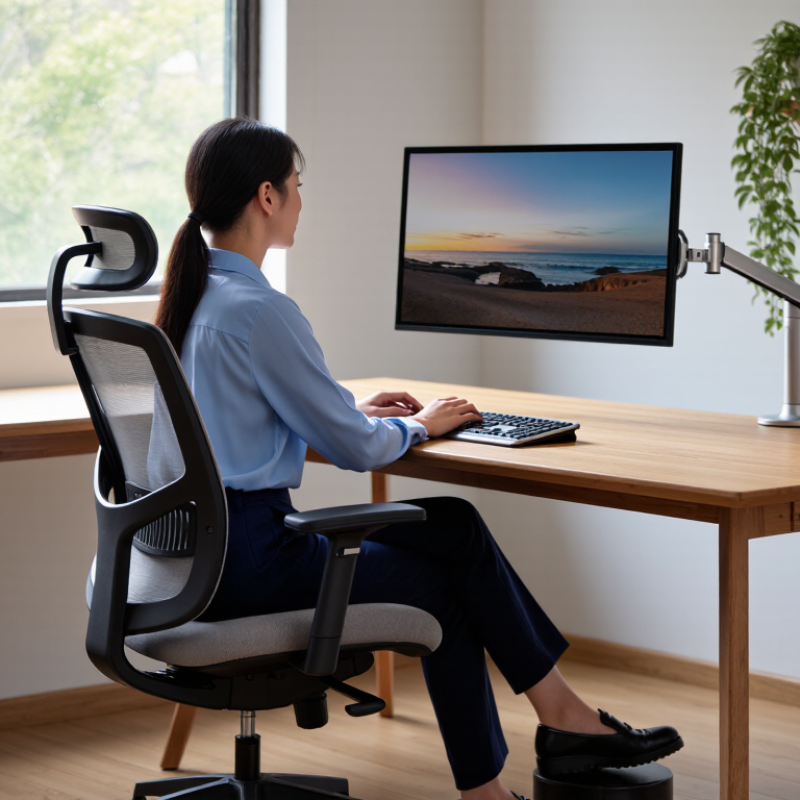
Top Products to Improve Comfort During Long Working Hours

Ergonomic Chairs for Better Posture and Lower Back Support

Top Products to Improve Comfort During Long Working Hours

Ergonomic Chairs for Better Posture and Lower Back Support

Long working hours can turn a comfortable desk into a source of stiffness. An ergonomic chair supports better posture without forcing the body into one rigid position. I once used a chair with firm lumbar support, yet I still leaned toward the screen by afternoon. The chair helped, but my habits needed attention too.

Look for adjustable seat height, seat depth, backrest angle, and armrests. Your feet should rest flat on the floor. That detail matters. Keep your knees near hip level, with your shoulders relaxed and your elbows close to the body. A breathable backrest can also reduce heat during long sessions, especially in a warm home office.

Workplace ergonomics guidance generally favors regular movement over perfect sitting. Adjust the chair so your lower back feels supported, but avoid pressing hard against the lumbar area. Recline slightly when reading, then move closer for detailed tasks. I still catch myself sitting on one leg, which defeats the chair’s design. A short walk, a shoulder roll, or a standing task every hour may help more than another adjustment. A chair is not a medical treatment, and persistent pain deserves advice from a qualified health professional.

Adjustable Desks for Healthier Sitting and Standing Options

Long working hours can make a fixed desk feel restrictive. An adjustable desk offers a practical way to alternate between sitting and standing. The goal is movement, not standing all day. In my experience, changing position every 30 to 45 minutes feels more sustainable than holding one posture.

Set the desktop near elbow height when standing. Your shoulders should stay relaxed, while your wrists remain level during typing. Keep the monitor directly in front of you, with its upper edge close to eye level. A separate keyboard may help when the desk rises, because a laptop screen and keyboard cannot stay ideal together. Small adjustments matter.

Try standing for short tasks, such as reading messages or joining a brief call. Use a supportive chair during focused writing. A soft mat can reduce pressure on your feet, but it cannot replace comfortable shoes or sensible breaks. Listen to early signs of fatigue. I sometimes raise the desk too quickly and lose concentration, which is a useful reminder to adjust gradually. Height presets can help, although personal measurements still matter more than convenient buttons. People with persistent pain should seek advice from a qualified health professional rather than relying on desk adjustments alone.

Monitor Stands and Laptop Risers for Comfortable Viewing Angles

Long working hours become harder when a monitor sits too low or too close. The Occupational Safety and Health Administration recommends placing the screen about 20 to 40 inches from the eyes. Its guidance also places the monitor’s top edge at, or slightly below, eye level. A monitor stand can create this height without forcing the neck forward. Your eyes should meet the upper third of the display naturally.

Laptop users often need more adjustment. A laptop riser can lift the screen, but the built-in keyboard may then strain the wrists. Use an external keyboard and mouse when possible. The 2023 Digital Eye Strain report from The Vision Council reported that 70% of U.S. adults experience related symptoms. Small changes matter. Reduce glare, keep text readable, and position the screen away from direct window reflections. A riser cannot fix every ergonomic problem.

I once raised a laptop too high and created shoulder tension. That was an easy mistake. Test the setup for 30 minutes before committing to it. A comfortable viewing angle should keep the chin level and the shoulders relaxed. The National Institute for Occupational Safety and Health also emphasizes neutral postures and adjustable workstations in its ergonomics guidance. Measure rather than guess. Your desk, chair, eyesight, and work habits may require different heights. Recheck the arrangement after a busy week. Comfort can change when fatigue reveals what felt acceptable on day one.

Top Products to Improve Comfort During Long Working Hours

Monitor stands and laptop risers can help position screens within commonly recommended ergonomic viewing ranges.

Reference targets shown are a viewing distance of approximately 51–102 cm and a downward viewing angle of approximately 15–20°. A monitor stand or laptop riser can help users adjust screen height and maintain a more comfortable viewing position during extended work sessions.

Keyboard, Mouse, and Wrist Supports for Reduced Hand Strain

Top Products to Improve Comfort During Long Working Hours

Keyboard, Mouse, and Wrist Supports for Reduced Hand Strain

A comfortable workstation begins with tools that match your natural movements. A low-profile keyboard can reduce excessive wrist extension while typing. Keep your elbows near your sides, and place your hands slightly below elbow height. The change may feel awkward at first. That is normal.

A mouse should fit your palm without forcing your fingers to stretch. Use one that allows gentle clicking and smooth movement. A wrist support can cushion contact with the desk, but it should not press firmly against the wrist crease. Rest your palm lightly, especially during pauses. I once relied on a thick pad and noticed more pressure, not less. The problem was not the product alone; my posture and grip were also poor.

Short breaks remain essential, even with ergonomic equipment. Every 30 to 45 minutes, relax your fingers and rotate your shoulders. Look away from the screen for a moment. If tingling, numbness, or persistent pain develops, stop testing new adjustments and seek advice from a qualified healthcare professional. Product descriptions cannot replace an individual assessment. Comfort should improve gradually, not through forced stretching or tighter supports. Track what changes help, because a setup that works for one person may fail for another.

Footrests, Lighting, and Other Accessories for Workplace Comfort

Top Products to Improve Comfort During Long Working Hours

Footrests, Lighting, and Other Accessories for Workplace Comfort

A well-chosen footrest can reduce pressure under your thighs during long desk sessions. Set it high enough to keep both feet supported, but not so high that your knees rise sharply. A textured surface can prevent slipping when you shift position. Small changes matter. I prefer an adjustable model because desk height and footwear often change throughout the day. It should feel stable, not like another object requiring constant attention.

Lighting also shapes comfort and concentration. Place a desk lamp beside your screen, rather than directly behind it, to reduce reflections. A diffused, adjustable light can soften harsh shadows on paperwork and keyboards. Keep the screen away from bright windows when possible. Ergonomic guidance commonly recommends a neutral viewing position, with the monitor near eye level. However, perfect alignment is difficult in shared workspaces. That is worth acknowledging.

Other useful accessories include a document holder, a compact keyboard, and a soft wrist support. A document holder can reduce repeated neck bending when reading printed pages. Wrist support should cushion the hands without forcing them upward. My own setup became crowded after adding too many accessories. Not always. Removing one item improved movement more than buying another. Check your posture after an hour, not only during the first comfortable minute.

Top Products to Improve Comfort During Long Working Hours - Footrests, Lighting, and Other Accessories for Workplace Comfort
Product Category Recommended Product Type Key Comfort Features Typical Dimensions or Output Best Use Case Adjustability Estimated Price Range Comfort Rating
Foot Support Adjustable under-desk footrest Angled surface, non-slip texture, stable base, removable massage rollers Approximately 40–150 mm height adjustment; platform commonly 400–500 mm wide Desks where feet do not rest comfortably on the floor Height and tilt adjustment US$20–60 ★★★★★
Foot Support Rocking footrest Curved base encourages ankle movement and changes in leg position Typically 400–500 mm wide and 250–350 mm deep Users who prefer frequent lower-leg movement while seated Self-rocking motion; some models offer height settings US$25–70 ★★★★☆
Lighting Dimmable LED task lamp Adjustable arm, diffused light, multiple brightness settings, low-heat operation Commonly 400–800 lumens; color temperature often adjustable from 2,700–6,500 K Focused paperwork, reading, and detailed desk tasks Brightness, color temperature, and lamp position US$25–100 ★★★★★
Lighting Monitor-mounted light bar Asymmetric downward lighting helps illuminate the desk while reducing screen glare Usually 400–550 mm wide; commonly offers 300–700 lux at the desk surface Compact workstations with limited desk space Brightness, color temperature, and beam angle US$35–120 ★★★★☆
Lighting Indirect ambient desk light Soft upward or diffused illumination helps reduce strong contrast between the screen and surroundings Typically 500–1,500 lumens depending on room size and placement Work areas with uneven or insufficient general lighting Brightness and direction, depending on design US$30–90 ★★★★☆
Monitor Positioning Height-adjustable monitor stand Raises the display, creates storage space, and supports a more neutral neck position Common height range of 80–150 mm; load capacity often 10–20 kg Displays positioned too low on the desk Height adjustment on selected models US$25–80 ★★★★★
Monitor Positioning Adjustable monitor arm Frees desk space and allows precise screen positioning for height, distance, and angle Typical reach of 350–500 mm; many models support screens from 17–32 inches Users who change posture or alternate between sitting and standing Height, depth, tilt, swivel, and rotation US$40–180 ★★★★★
Keyboard and Mouse Low-profile ergonomic keyboard Reduced key height, compact layout, and optional split or angled design Usually 280–450 mm wide; wired and wireless versions available Typing-intensive work and smaller desks Layout, tenting, or palm support depending on model US$35–150 ★★★★☆
Keyboard and Mouse Vertical or trackball mouse Alternative hand position or reduced mouse travel can lessen repetitive movement Commonly designed for right- or left-hand use; connection may be wired or wireless Users experiencing discomfort during frequent pointer movement Button configuration and sensitivity settings US$30–120 ★★★★☆
Wrist and Forearm Support Gel or foam wrist rest Soft cushioning, washable cover, and a non-slip underside Typically 430–500 mm wide for keyboards; height commonly 15–25 mm Desks where the keyboard edge creates pressure on the wrists Generally fixed; select models offer height options US$10–35 ★★★☆☆
Seating Support Seat cushion with pressure-relieving foam Contoured shape, breathable cover, and cushioning designed to distribute sitting pressure Commonly 400–470 mm wide and 350–450 mm deep Firm or flat office chairs that cause discomfort during extended sitting Usually fixed; some cushions include a wedge angle US$25–90 ★★★★☆
Seating Support Lumbar support cushion Contoured foam, breathable mesh, and adjustable straps for chair attachment Approximately 300–450 mm wide and 300–450 mm high Office chairs with limited lower-back contouring Position and strap tension US$20–70 ★★★★☆
Cable and Desk Organization Under-desk cable management tray Keeps chargers and power strips off the floor and reduces leg obstruction Commonly 600–900 mm wide and 100–150 mm deep Workstations with multiple electronic devices Mounting position and cable routing US$20–60 ★★★☆☆
Movement Support Compact under-desk pedal exerciser Low-impact movement, adjustable resistance, and a compact footprint Typically 400–550 mm long and 300–400 mm wide Adding light leg movement during low-concentration tasks Pedal resistance and display settings US$40–150 ★★★☆☆

Product dimensions, output levels, load capacities, and prices are typical market ranges for comparable unbranded products. Actual specifications vary by model. For general office tasks, task lighting around 500 lux is commonly used as a practical reference, while comfort also depends on desk height, monitor placement, posture changes, and regular breaks.

FAQS

How far should a monitor sit from your eyes?

Keep the screen roughly 20 to 40 inches away. Adjust it until text feels clear without leaning forward.

Where should the top of the monitor be positioned?

Place the top edge at, or slightly below, eye level. Your eyes should meet the upper third naturally.

Can a laptop riser solve every ergonomic problem?

No. Raising the screen may bend your wrists over the built-in keyboard. Use an external keyboard and mouse when possible.

How can I test a new screen height?

Work with it for 30 minutes, then check your chin and shoulders. Keep your chin level and shoulders relaxed. Measure, do not guess.

What common mistake can happen with a laptop riser?

Raising it too high can create shoulder tension. I once made that mistake. The taller setting looked helpful, but it felt wrong later.

How should a footrest be adjusted?

Keep both feet supported, with your thighs free from strong pressure. Your knees should not rise sharply. A textured surface can reduce slipping.

Where should a desk lamp go?

Place it beside the screen, not directly behind it. Diffused light can soften shadows on papers and keyboards. Reflections are annoying.

Which accessories can reduce repeated neck movement?

A document holder can keep printed pages near screen height. Compact keyboards and soft wrist supports may also help, but avoid crowding the desk.

How often should I reassess my workstation?

Check your posture after an hour and again after a demanding week. Comfort can change when fatigue appears. Perfect alignment is not always practical.

Conclusion

Improving comfort during extended work sessions starts with creating a workspace that supports natural posture and easy movement. An ergonomic chair can provide better lower-back support, while an adjustable desk allows you to alternate between sitting and standing throughout the day. Raising your monitor or laptop to a comfortable viewing height may reduce neck and shoulder tension, especially when the screen is positioned directly in front of you.

Other simple accessories can also make a noticeable difference. A suitable keyboard, mouse, and wrist support can help reduce pressure on the hands and wrists, while a footrest encourages a more relaxed leg position. Proper lighting helps prevent eye strain and makes the workspace more pleasant. Together, these practical adjustments offer effective ways for how to improve comfort during long working hours and maintain better focus, posture, and energy.

Ethan

Ethan

Ethan is a seasoned marketing professional with a deep expertise in our company's innovative product line. With a passion for sharing knowledge and insights, he takes the lead in regularly updating our corporate blog, where he explores industry trends, product features, and effective marketing......